
Ghost Mannequin on Amazon: Main Image or Secondary Image? The Rule Apparel Sellers Get Wrong
Ghost mannequin is allowed on Amazon, but not always as a main image. Learn the main versus secondary rule and build a compliant apparel gallery.
10/28/202619 min read

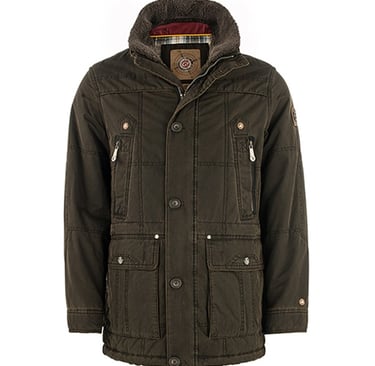
Ghost mannequin photography is one of the most useful tools in apparel e-commerce. It shows a garment's shape, fit, and drape without a visible mannequin, giving buyers a clean, three-dimensional view of the product itself. Many sellers therefore assume that a ghost mannequin image can be used anywhere in an Amazon gallery, including as the main image.
That assumption is the mistake this article corrects. Ghost mannequin images are allowed on Amazon, but not always as a main image. Using one in the wrong slot can lead to suppression, even when the image itself is beautifully edited. The fix is not to stop using ghost mannequin images. It is to put each image type in the right slot.
What ghost mannequin actually shows
A ghost mannequin image, also called invisible mannequin, is created by photographing a garment on a mannequin, then editing out the mannequin and joining the front and inner views so the garment appears to hold its own shape. The result is a clean packshot: no model, no mannequin, no distraction. Buyers can see the cut, the neckline, the sleeves, and the drape, without wondering how the garment will look on a body.
That clarity is why ghost mannequin images are so valuable as verification images. They answer the question: "What exactly am I buying?" A model shot answers a different question: "How will this look on me?" Both questions matter, but they are not interchangeable, and Amazon's rules treat them differently.
A good ghost image does more than remove the mannequin. Look for these specific qualities when you review one: the neckline holds a natural, hollow shape rather than collapsing flat or looking pasted on; both sides of the garment mirror each other where the design is symmetrical; sleeves fall at the same angle and length; the hem sits level; and the fabric keeps its true colour and texture instead of looking washed out or over-smoothed. If the neck join is visible as a hard seam, if one shoulder sits higher than the other, or if a sleeve looks twisted, the image may still be recognisable, but it will not do the verification job well. Buyers notice those faults at zoom, even if they look acceptable as a small thumbnail.
Ghost images are also not the same as flat lays. A flat lay shows a garment laid flat, which is useful for pattern, print, and colour, but it hides depth, shoulder shape, and how a collar stands. A ghost image preserves that depth. That is why the two types complement each other in a gallery rather than replacing each other: use the ghost view for shape, and a flat detail for texture and print.
The rule, in plain terms
Amazon's apparel image guidance, as described in current marketplace guides, draws a distinction that many service pages gloss over:
- Visible mannequins are prohibited in listing images.
- Ghost mannequin images, where no mannequin is visible, are allowed for off-figure or alternate images.
- For adult apparel, the main image generally needs a live model, with exceptions for certain categories.
The exceptions described in guides include children's undergarments, leotards, swimwear, and socks, among others. Those exceptions exist because a live model is not always appropriate or practical for those products. For most adult apparel, however, the main image is expected to show the garment on a real person.
This is why a service page that simply says "Amazon-compliant ghost mannequin" can mislead. The image may be compliant as a secondary image, but not as a main image for that category. Always check the rule for your specific product type in Seller Central, rather than relying on a general claim.
How to check your own category, step by step
Do not rely on memory, a competitor's listing, or a blog post — including this one — as the final word for your product. Use this short check before you upload or re-upload:
1. Open the listing in Seller Central and confirm the exact product category and sub-category you are listed under. A hoodie, a leotard, and a pair of socks may sit under different rules even though all three are apparel.
2. Look for the image guidance for that category in Seller Central, and read the main-image requirement separately from the secondary-image guidance. The two are not the same, and a rule that allows a ghost image in one slot does not automatically allow it in the other.
3. Write down, for that listing, which image type belongs in slot one and which types belong in later slots. Keep that note with the image files, so a future re-upload does not accidentally restore the wrong hero.
4. If the guidance for your category is unclear, or if it appears to have changed, do not guess from another seller's gallery. Check the current guidance in Seller Central again, or ask for clarification through the channel Amazon provides for that listing, before you publish.
That four-step check takes a few minutes per product type, and it prevents the most expensive version of this mistake: building a whole catalogue around one hero image, then having to rebuild every main image later.
The 30-second slot test
When you are unsure where an image belongs, run it through three questions in order. Stop at the first question that gives you a clear answer.
1. Can you see a mannequin, a mannequin part, or a mannequin stand? If yes, do not upload that image in any slot until it is re-edited. A visible mannequin is a problem wherever it appears, not only in the main image.
2. Is there a person in the image? If the image shows a live model wearing the garment, it is a candidate for the main image for adult apparel, subject to the usual main-image checks on background, fill, and framing. If there is no person at all, it is a ghost, flat, or detail image — useful, but not the default hero for most adult apparel.
3. What new question does this image answer? A main image answers "how does this look worn?" A ghost front answers "what is the true shape?" A ghost back answers "what does the back look like, without a pose hiding it?" A detail answers "what is the fabric, collar, or stitching really like?" If an image answers no new question, it is a duplicate, however clean it looks, and it is taking up a slot a more useful view could fill.
Use this test on every image in the set, not only on the hero. It is the fastest way to catch a set where the best-looking image was put first and the buyer questions were never planned.
Four worked examples
These examples show how the same rule plays out differently by product. In each case, the category check in Seller Central for that specific product remains the deciding step, as described above.
Example 1: An adult hoodie. The seller has a clean ghost front, a ghost back, and a model shot. The compliant pattern is: model shot as the main image, ghost front second, ghost back third, then a close detail of the hood, pocket, and cuff. Putting the ghost front first, even though it is the cleanest and most consistent image, is the classic error. The fix is a reorder, not a re-shoot: the model shot already exists, it simply needs to move to slot one.
Example 2: An adult dress with a detailed back. The back neckline and fastening are the selling point, and they are hard to show on a model without an awkward pose. The gallery still starts with a model front as the main image for adult apparel, then uses the ghost back as the second image, where buyers can study the back without distraction. The ghost back earns its place precisely because it is second, not because it was forced into the hero slot.
Example 3: Socks. Socks are among the categories described in guides as exceptions where a non-model main image may be acceptable. A seller in this category should still confirm the exception for their exact product in Seller Central, and still check the other main-image points: pure white background, high fill rate, and no text, logos, or props. An exception to the model rule is not an exception to every main-image rule.
Example 4: A wholesale set reused across channels. A wholesaler supplies the same image set to retailers, to their own website, and to Amazon. On their own website, the ghost front is the hero, because that site has no model-main rule. On Amazon, the same set must be reordered: model first, ghost second and third. The images do not need to be re-edited for Amazon, only reordered and relabelled by slot. Sellers who skip that relabelling step are the ones who upload the website hero to Amazon by habit and only discover the difference afterwards.
The lesson across all four examples is the same: plan by slot first, and let image quality decide the order within each slot, not across slots.
Why sellers get this wrong
There are three common reasons for the confusion.
First, many sellers start on their own website or on another marketplace, where a ghost mannequin image is often used as the hero image. When they move the same image set to Amazon, they keep the same hero, without realising Amazon's main-image rule is different.
Second, ghost mannequin images look professional and consistent. It is tempting to use the cleanest, most consistent image as the main image, even if it is not the right type for that slot.
Third, some editing services deliver a ghost mannequin set without explaining the main-versus-secondary distinction. The seller receives excellent images, uploads the first one as the main image, and only learns about the rule when the listing is suppressed.
Two further traps are worth naming. Fourth, colour variants: a seller photographs one colour on a model and the rest only as ghost images, then uses the ghost image as the main image for the unphotographed colours. That creates a mixed catalogue where some variants start with a model and others start with a ghost image, and the inconsistency itself becomes hard to manage. The practical fix is to plan model coverage per variant from the start, or to accept that a variant without a model shot is not ready to be the hero for adult apparel until one exists.
Fifth, supplier images: a brand receives a ready-made set from a factory or supplier, with the ghost image labelled as the first file, and uploads the files in the order received. File order is not gallery order. Rename files by slot before upload — for example, by putting the intended slot in the filename — so that upload order cannot silently become gallery order.
None of these are careless mistakes. They are the natural result of reusing one image set across platforms with different rules. The solution is to plan the gallery by slot, not by image quality alone.
Build a compliant gallery: model hero, ghost detail, flat detail
A practical, compliant gallery for most adult apparel follows this pattern:
Main image: live model
Use a live model wearing the garment, on a pure white background, with the product filling most of the frame and no text, logos, or props. This is the image buyers see in search results, and it is the image Amazon's main-image rule is most concerned with.
Check the usual main-image points as well: pure white background, high fill rate, zoom-ready size, and no part of the garment cut off at the frame edge. A model main image that fails on white background or fill will still be a problem, even if it is the right type of image.
Secondary images: ghost mannequin
Use ghost mannequin images as secondary images to show shape, construction, and detail. A front ghost view, a back ghost view, and a close detail of the collar, fabric, or stitching give buyers the verification they need, without replacing the model hero.
Ghost images are particularly useful for showing:
- The true shape of the garment, without a model's pose changing the drape
- The back view, which is often hard to show clearly on a model
- Neckline, pocket, and hem details that are easy to miss in a full-body shot
Further secondary images: flat detail and lifestyle
Add flat detail shots for fabric texture, care labels where relevant, and colour variants. Add lifestyle images only in later slots, where Amazon's rules for secondary images allow them, and keep them clearly secondary to the product itself.
This gallery blueprint does two jobs at once. It satisfies Amazon's slot rules, and it gives buyers both kinds of information they need: desire from the model shot, and truth from the ghost shot. Guides that describe this as "packshot for truth, on-model for desire" capture the idea well. Neither type alone does the full job.
A complete slot-by-slot example
For a typical adult top, a workable eight-slot sequence looks like this:
1. Model, front, on white — the hero.
2. Ghost mannequin, front — true shape, no pose distortion.
3. Ghost mannequin, back — back shape, neckline, and fastening.
4. Detail close-up — collar, fabric texture, and stitching.
5. Detail close-up — pocket, hem, cuff, or other construction point buyers ask about.
6. Flat detail — print, pattern, or colour accuracy, shown without depth distortion.
7. Size or fit reference — for example, a garment measurement view or a fit note image, only where the secondary-image rules for your category allow it, and without text that belongs in the listing copy rather than the image.
8. Lifestyle image — the garment in a real setting, kept last, so it supports the product rather than replacing the product views.
Not every product needs all eight slots, and not every category allows every slot type. The point of the sequence is the order of thinking: hero first, shape second, detail third, lifestyle last. If you can only produce four images, produce slots one to four, in that order, rather than four lifestyle or four ghost images. A short gallery in the right order serves buyers better than a long gallery in the wrong order.
Which ghost views to include, by garment type
Different garments hide different information, so the ghost views that matter most change with the product. Use this as a starting checklist, then adjust for the details buyers actually ask about for your product.
- Tops, hoodies, and shirts: ghost front, ghost back, and a close view of the collar or hood, plus the cuff or hem where those are distinctive. For a hoodie, the inside of the hood and the pocket construction are common buyer questions.
- Trousers and jeans: ghost front, ghost back, waistband and pocket detail, and a hem or leg-opening detail. The back-pocket shape and stitching are often the detail that separates one style from another.
- Dresses: ghost front, ghost back, waist and neckline detail, and a hem or lining detail where the dress has one. The back view matters most here, because a model pose can hide a back fastening or neckline entirely.
- Jackets and outerwear: ghost front open and closed where both states matter, ghost back, collar or hood detail, and a zip, button, or pocket close-up. A jacket photographed only closed hides its lining and inner construction.
- Knitwear: ghost front, ghost back, and a close texture view that shows the knit itself, not just the silhouette. Knit buyers judge by texture, so a smooth, over-retouched ghost image that erases the knit pattern does them no favours.
For each garment, ask one practical question before you brief the shoot or the edit: "What would a buyer need to zoom in on before they felt confident to buy, without trying this on?" The answer to that question is your ghost and detail shot list.
Ghost editing mistakes that hurt even in secondary slots
A ghost image in the right slot can still hurt the listing if the edit itself is flawed. These are the defects to check for, with the fix for each:
- Visible neck seam or pasted neck. The join between the outer view and the inner neck view shows as a hard line or a flat, grey patch. Fix: re-join the views so the neck keeps a hollow, natural depth, and check the result at full zoom, not only as a thumbnail.
- Asymmetry where the design is symmetrical. One shoulder higher, one sleeve longer, or a hem that slopes. Fix: compare left and right sides directly, and correct the shape before delivery rather than smoothing over the difference.
- Flattened or twisted sleeves. Sleeves that look ironed flat lose the garment's depth and make the fit hard to judge. Fix: keep a natural sleeve volume and angle, matching the front and back views.
- Leftover mannequin edge. A sliver of mannequin, stand, or pin visible at the neck, cuff, or hem. Fix: re-cut that edge cleanly. Even a small leftover edge undermines the "invisible" claim of the whole image.
- Colour shift after cutout. The garment looks brighter, duller, or cooler than the physical sample after background removal and cleaning. Fix: compare the edited image against a colour reference or the original shot under the same viewing conditions, and correct the colour before upload, rather than accepting a "close enough" version.
- Over-smoothed fabric. Wrinkle removal that also erases texture, stitching, or knit pattern. Fix: smooth only distracting creases, and preserve the fabric structure buyers use to judge quality.
- Uneven or grey background. A background that is not pure white, or that shows a shadow gradient, makes the main and secondary images look inconsistent as a set. Fix: clean the background to a consistent pure white across the whole set, and check all images side by side before upload.
Run through this list on the ghost images alone, before you judge the gallery as a whole. A gallery with a strong hero and flawed ghost images still leaves buyers with unanswered questions at the exact moment they are deciding.
What about AI models?
AI-generated models add another layer to this decision, and they should not be confused with ghost mannequin images. An AI model image shows a generated person wearing the garment. A ghost mannequin image shows no person at all.
If you use an AI model image, you must also consider Amazon's AI-people disclosure rule, which requires tagging photorealistic AI-generated people in the image metadata before upload. That rule is separate from the main-versus-secondary rule, and both must be followed. A tagged AI model image does not automatically become a compliant main image in every category, and a ghost mannequin image does not need an AI-people tag, because it contains no person.
For many apparel brands, the safest combination is: a real model for the main image where required, ghost mannequin images for detail and verification, and AI model images, if used, in appropriate secondary slots with correct tagging. That combination keeps the gallery compliant while still using the speed and cost benefits of AI where they help.
A practical decision rule helps here. If the question is "who wears this, and how does it fit a real body?", use a real model. If the question is "what is the exact shape and construction?", use a ghost image. If you are considering an AI model, ask first whether it is solving a real gap — for example, showing a fit on a different body type in a secondary slot — or whether it is simply replacing a real model shot you already have. If it is replacing a required real model main image, tagging alone does not solve that slot problem, and the category check in Seller Central should be done before the image is used as a hero.
Fixing a listing that already uses a ghost image as its main image
If you discover that a live listing already has a ghost image in slot one, do not panic, and do not simply re-upload the same set in the same order. Work through these steps in order:
1. Confirm the problem. Check which image is actually in slot one, and confirm the category rule for that product in Seller Central, as described earlier. A listing is not fixed by guessing; it is fixed by knowing which slot is wrong.
2. Find or create the correct hero. If a model shot already exists in the set, move it to slot one. If no model shot exists for that variant, that variant needs a model shoot before its hero can be corrected for adult apparel. Do not substitute a flat lay or a lifestyle image as a shortcut hero without checking whether that type is allowed as a main image for your category.
3. Move the ghost images to secondary slots. Keep the ghost front and back, but place them second and third, where they do their best work. Do not delete good ghost images just because they were in the wrong slot; reorder them.
4. Re-check every image for visible mannequins. A reorder is the right moment to catch a leftover mannequin edge in a secondary image that was previously overlooked.
5. Re-upload and re-check the listing. After re-uploading, view the listing as a buyer would, in search and on the product page, and confirm that the hero is the model image and the ghost images follow it. Keep a note of the corrected order with the image files, so the next team member does not restore the old order.
6. Apply the same fix to variants. If the same ghost hero was used across colour variants, fix each variant, not only the first one you noticed. A partial fix leaves the same problem live on the rest of the catalogue.
No step in this list can guarantee a particular outcome for a specific listing, because the final decision rests with Amazon's review for that category and listing. What the steps do guarantee is that you are no longer relying on hope: the gallery order, the image types, and the category check are all documented and repeatable.
Checklist before you upload an apparel gallery
Before you publish or re-publish an apparel listing, check:
1. Is the main image a live model image, for adult apparel where that is required?
2. Are ghost mannequin images in secondary slots, not as the main image?
3. Is the main image on pure white, with a high fill rate and zoom-ready size?
4. Are there any visible mannequins in any image? If so, remove or re-edit those images.
5. If any image contains an AI-generated person, is its metadata tagged correctly?
6. Does every image answer a new buyer question, rather than repeating the same angle?
7. Have you checked the category rule for this exact product in Seller Central, rather than relying on another product's rule?
8. Are the ghost front and back symmetrical, with a natural neck join and no leftover mannequin edge?
9. Does the garment colour in the edited images match your colour reference, rather than drifting brighter, duller, or cooler?
10. Have you viewed the gallery in listing order, as a buyer would, and confirmed that the hero, shape, and detail views appear in that order?
If you answer yes to all ten, your gallery is in a much stronger position than a gallery that simply uploads the best-looking image first. If any answer is no, fix that item before publishing, rather than publishing first and correcting later. A gallery uploaded in the wrong order is harder to manage than a gallery held for one more check.
What to send an editor
If you outsource ghost mannequin editing, send:
- The original mannequin shots, front and back, plus any inner neck or label shots the editor needs to join the views
- The product category, so the editor and you can agree on main versus secondary use
- Colour references, so the garment colour stays true after cutout and background cleaning
- The image set you plan to use as the main image, so the editor does not accidentally deliver a ghost image as your hero without flagging it
A good editor should return clean, symmetrical ghost views with natural shape and no visible mannequin parts, and should be able to tell you which images in the set are suitable for main versus secondary use on Amazon.
A brief template you can copy
A short, complete brief prevents most back-and-forth. Include these lines for each product, and attach the files they refer to:
- Product and SKU: the product name and SKU, so the returned files can be matched to the right listing without guessing.
- Category and intended slots: the product category, and for each file, whether it is intended as a main image, a ghost secondary, a detail, or a flat image. State explicitly: "Ghost images in this set are for secondary slots only."
- Shots supplied: front on mannequin, back on mannequin, inner neck or label view, and any detail shots. Note any shot that is missing, so the editor can flag a gap instead of inventing a view.
- Colour reference: a reference image or a physical sample description for each colourway, with a note on which colours must not drift. If a colour is hard to reproduce, say so, so the editor checks it rather than assuming it.
- Shape notes: anything distinctive about this garment — an asymmetrical hem, a dropped shoulder, a structured collar — so the editor does not "correct" a design feature into symmetry by mistake.
- Background and output: pure white background, and the file format and size you need for upload. Confirm these before the edit starts, not after delivery.
- Return naming: ask for returned files named by slot, so upload order is visible in the filename itself.
If a brief is missing the category and slot information, the editor can still produce beautiful images, but cannot warn you that the hero is a ghost image. That warning is part of the service, not an extra, and it only happens when the brief includes the slot plan.
How to check the editor's delivery before you upload it
Do not approve a delivery on thumbnails alone. Check each returned ghost image at full zoom, in this order:
1. Neck and joins: is the neck hollow and natural, with no hard seam or flat patch?
2. Symmetry: flip the image mentally, or compare left and right sides side by side. Do shoulders, sleeves, and hem match where the design is symmetrical?
3. Edges: run your eye around the full outline. Is there any mannequin edge, pin, or stand left visible?
4. Colour: compare the garment against your reference. Has the colour stayed true, or has it shifted during cutout and cleaning?
5. Texture: has the fabric texture, stitching, and knit or weave survived the edit, or has smoothing erased it?
6. Set consistency: view all images from the same product side by side. Do background, colour, and shape look like one set, or does one image stand out as edited differently?
If any check fails, send that image back with the specific fault named — "neck seam visible at full zoom" is actionable, while "does not look right" is not. A clear rejection note gets a faster, more accurate correction than a vague one.
Frequently asked questions
Can I use a ghost mannequin image as my main image if I do not have a model shot yet?
For most adult apparel, the guidance described in marketplace guides points the other way: the main image generally needs a live model. A missing model shot is a reason to plan a model shoot, not a reason to promote the ghost image to slot one without checking the category rule in Seller Central for that product.
Does the exception for socks or swimwear mean I can ignore the other main-image rules?
No. An exception described for a category concerns the model question. The other main-image points — pure white background, high fill rate, zoom-ready size, and no text, logos, or props — still need to be checked for that listing.
Can I use a flat lay as a main image instead of a model shot?
Only if the main-image guidance for your specific category allows that type. Do not assume a flat lay is interchangeable with a model shot, and do not assume it is interchangeable with a ghost image either. Check the category guidance in Seller Central, and treat the flat lay as a detail or secondary view unless that check says otherwise.
Do I need a separate model shot for every colour variant?
That depends on how your variants are listed and what buyers need to judge colour and fit for each variant. As a practical rule, do not let a variant go live with a ghost hero simply because its model shot was not photographed. Plan model coverage per variant, or hold that variant's hero until a model shot exists, and keep the ghost images ready in secondary slots for when it does.
Does a ghost mannequin image need an AI-people tag?
No, on the reasoning given earlier: a ghost image contains no person, generated or otherwise, so there is no photorealistic AI-generated person to tag. The AI-people tagging question applies to images that do contain a generated person. If an image set mixes ghost and AI model images, tag only the images that actually contain a generated person, and check the tagging guidance for those images before upload.
Can I use the same gallery on my own website and on Amazon?
You can reuse the same images, but you should not reuse the same order blindly. Your own website may use a ghost image as its hero. Amazon, for most adult apparel, generally expects a model hero. Reorder by slot for each channel, and keep a slot plan per channel with the image files, so a future update does not overwrite the Amazon order with the website order.
What if a competitor uses a ghost image as a main image and their listing is live?
A live competitor listing is not proof that the rule allows it for your category, and it is not proof that the listing will stay live. Categories differ, enforcement timing differs, and a listing that is live today may not have been checked yet. Base your gallery on the category guidance in Seller Central for your own product, not on a competitor's current gallery.
Try it on your own collection
If you have an apparel collection where ghost images are currently used as main images, test the fix on one product first. Fix The Photo Online offers a free trial: one free image, no credit card required, typically completed in 2–4 hours. Standard turnaround is 24–48 hours, rush turnaround is 6–12 hours, and support is available 24/7.
Send your ghost mannequin images and your planned main image, and ask for a compliant gallery set with clear main and secondary roles. Contact: contact@fixthephotoonline.com. You can also start from the Free Trial page or the Fashion and Apparel page on fixthephotoonline.com.
Fix The Photo Online
Professional photo editing & retouching services for everyone. Email: contact@fixthephotoonline.com
© 2026 Fix The Photo Online. All rights reserved.
Services
Company
Contact
Email: contact@fixthephotoonline.com Phone: +1 (419) 506-5585 117 Jefferson Avenue #16, Brooklyn, NY 11216